
The touchscreen MacBook Pro 2026 introduces a major change to Apple’s professional laptop lineup, combining touchscreen controls with a high-quality OLED display and powerful Apple silicon. This new laptop offers another way to interact with content while retaining the familiar keyboard and trackpad experience. From creative professionals to everyday users, many people will be interested in how these features affect productivity, performance, and the overall MacBook experience.
For years, MacBook users have relied mainly on the keyboard and trackpad to control their devices. The addition of touchscreen support creates another way to interact with content, whether someone is editing photos, working on presentations, managing creative projects, or browsing the web.
However, the biggest question is whether these changes offer enough practical value to justify the premium price. In this guide, we explore seven important features of the 2026 touchscreen MacBook Pro, its pricing, availability, and the type of user who may benefit most from the upgrade.
The touchscreen MacBook Pro 2026 brings a new level of flexibility to Apple’s professional laptop experience.
1. Touchscreen Support for the First Time
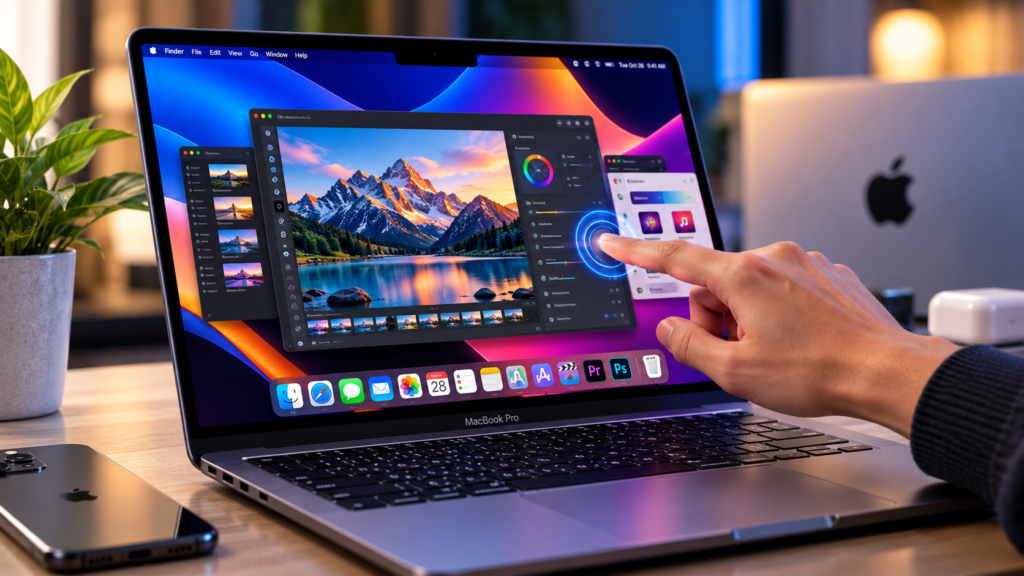
The most significant change is the arrival of touchscreen functionality on the MacBook Pro. Users can interact directly with compatible content instead of relying exclusively on the trackpad or mouse.
Simple actions include scrolling through webpages, zooming into photos, moving presentation slides, and adjusting windows with touch gestures. These controls can make certain tasks feel more direct and convenient.
Touch input could be particularly useful for graphic designers, photographers, musicians, and other creative professionals. For example, a designer may find it easier to manipulate an image directly on the screen, while a musician could interact with compatible software instruments using their fingers.
Importantly, the touchscreen does not replace the traditional MacBook experience. The keyboard and trackpad remain available, allowing users to choose the control method that works best for each task.
For creative professionals, the touchscreen MacBook Pro 2026 may offer a more direct way to interact with compatible applications.
2. A New Tandem OLED Display
Display quality is another major highlight of the new MacBook Pro. Apple has introduced its PROLED XDR display, which uses tandem OLED technology to deliver high brightness, strong contrast, and detailed colours.
According to Apple, the display offers peak brightness of up to 2,000 nits, a contrast ratio of 10,000,000:1, and a variable refresh rate of up to 120Hz. It also supports the P3 and Adobe RGB colour spaces.
These specifications may appeal to professionals who need accurate visuals for photography, video editing, graphic design, and other colour-sensitive work.
The high refresh rate can also make scrolling and supported animations appear smoother. Meanwhile, OLED technology helps produce deep blacks and clear separation between bright and dark areas.
Although these features sound impressive on paper, real-world display performance will depend on the content, settings, and working environment.
The touchscreen MacBook Pro 2026 combines touch interaction with a display designed for detailed visual work.
3. Dynamic Island Comes to Mac
Apple has also introduced Dynamic Island to the MacBook Pro. This interface provides a compact area for accessing features such as Spotlight search, Live Activities, and Siri AI.
The idea is to make useful information and controls accessible without interrupting the task currently open on the screen.
For example, users may be able to access search tools or check supported live updates while continuing to work in another application. The interface could also provide a more convenient way to interact with certain system features.
Its usefulness will depend on how well it fits into everyday routines and how developers support the available features. For users who regularly switch between multiple applications, even small improvements to navigation may make a difference over time.
The touchscreen MacBook Pro 2026 also aims to make everyday navigation more convenient through its updated interface.
4. M5 Pro and M5 Max Processing Power
The touchscreen MacBook Pro features Apple’s M5 Pro and M5 Max chips, designed for demanding professional workloads.
Processing power matters when working with large video files, complex design projects, software development environments, and applications that require substantial computing resources.
A powerful chip can help applications handle intensive tasks efficiently, although the actual results depend on the software, workload, memory configuration, and other hardware components.
Buyers should also distinguish between the available configurations. A model with a more powerful chip may be appropriate for professional video production or other resource-intensive work, while a lower configuration may be sufficient for everyday productivity and lighter creative tasks.
Before upgrading, it is worth comparing independent performance tests rather than relying on processor names alone.
The performance of the touchscreen MacBook Pro 2026 will depend on the selected chip and configuration.
5. A Thinner and Lighter Design
Apple says the redesigned MacBook Pro is thinner and lighter than its predecessor. The 14-inch model weighs approximately three pounds, while the 16-inch model weighs approximately four pounds.
Portability can be important for professionals who travel regularly, attend meetings, work from different locations, or carry their computers between home and the office.
The smaller model may suit users who prioritise mobility, while the larger version offers more screen space for complex timelines, spreadsheets, editing interfaces, and multitasking.
Choosing between the two sizes ultimately depends on individual needs. A larger display can be valuable for creative work, but someone who travels frequently may prefer the more compact model.
For people who travel frequently, the touchscreen MacBook Pro 2026 offers a combination of portability and professional features.
6. Battery Life Designed for Long Workdays
Battery life is another important consideration for people who depend on their laptops throughout the day.
Apple advertises up to 24 hours of battery life for the new MacBook Pro. This figure represents the manufacturer’s stated maximum rather than a guaranteed result for every user.
Actual battery life can vary depending on screen brightness, applications, network activity, connected accessories, and the intensity of the workload.
For example, writing documents and browsing the web may place different demands on the battery than editing high-resolution video or running demanding professional applications.
Anyone considering this laptop for travel or mobile work should look for independent battery tests that reflect their typical usage.
Battery performance remains an important factor when deciding whether the touchscreen MacBook Pro 2026 suits your daily routine.
7. More Memory, Storage, and Professional Connectivity
The new MacBook Pro supports configurations with up to 128GB of unified memory and up to 16TB of storage. It also includes Thunderbolt 5 connectivity, a 12MP Center Stage camera, studio-quality microphones, and a six-speaker sound system.
These features may be particularly useful for people who manage large project files, work with high-resolution media, connect external equipment, or participate in frequent video calls.
Additional memory can help with demanding workloads and multitasking, while larger storage capacity provides more room for applications and project files.
Thunderbolt 5 can support compatible high-bandwidth workflows and accessories. However, the benefits depend on the devices and equipment being used.
Not every model includes the maximum memory or storage capacity, so buyers should check the precise configuration before placing an order.
The touchscreen MacBook Pro 2026 provides configuration options for users with different professional workloads.
Apple Touchscreen MacBook Pro 2026: Price and Availability
Apple announced the new touchscreen MacBook Pro on October 28, 2026. Pre-orders began on the same day, with availability scheduled to start on November 6, 2026.
In the United States, the 14-inch model with M5 Pro starts at $2,899, while the 16-inch M5 Pro model starts at $3,399. Higher-end configurations cost more, depending on the selected hardware.
Anyone considering the touchscreen MacBook Pro 2026 should compare local prices and configurations before purchasing.
These are US prices, not confirmed retail prices for Pakistan. Local prices may differ because of exchange rates, taxes, import costs, retailer margins, and availability.
Before purchasing, check Apple’s official announcement and current retailer listings for the exact model and configuration.
Official announcement: https://www.apple.com/newsroom/2026/10/apple-unveils-groundbreaking-macbook-pro-with-proled-xdr-display/
For more updates on the latest innovations, artificial intelligence, and digital trends, explore our Technology section on NuvWire. You can discover more technology news, product updates, and practical guides to help you stay informed about the rapidly changing digital world.
Is the Touchscreen MacBook Pro Worth Buying?
The new MacBook Pro may be worth considering for professionals who need a high-quality display, strong processing performance, and the flexibility of touchscreen interaction.
Photographers, designers, video editors, musicians, and developers may find the new features useful, particularly if their applications take advantage of touch controls.
However, not everyone needs a premium professional laptop. Users who mainly browse the internet, write documents, attend online meetings, or perform basic office tasks may find that an existing laptop already meets their requirements.
Before spending the money, consider these questions:
- Will touchscreen controls genuinely improve your daily work?
- Do your applications benefit from a high-quality OLED display?
- Do you need the processing power of an M5 Pro or M5 Max chip?
- How much memory and storage do your projects require?
- Would a less expensive laptop provide everything you need?
The best purchase is not necessarily the most expensive configuration. It is the device that offers the right balance of performance, convenience, and price for your actual needs.
Final Thoughts
Apple’s first touchscreen MacBook Pro introduces a new way to interact with the Mac while maintaining the keyboard-and-trackpad experience familiar to existing users. Its tandem OLED display, M5 Pro and M5 Max chips, Dynamic Island, and professional connectivity make it an important product launch for Apple’s laptop lineup.
Ultimately, the touchscreen MacBook Pro 2026 is most appealing to buyers who can benefit from its display, performance, and touch controls.
Still, the value of these improvements will depend on how people use them. Touch controls may be especially useful for creative work, while the display and processing capabilities could appeal to professionals with demanding workloads.
For buyers, the sensible approach is to compare configurations, check real-world reviews, and consider whether the new features solve problems they actually experience.
As the laptop market continues to evolve, Apple’s touchscreen MacBook Pro will be an interesting development to watch. Follow NuvWire for more technology news, product updates, and practical guides.
Frequently Asked Questions
Does the 2026 MacBook Pro have a touchscreen?
Yes. Apple introduced touchscreen functionality on the MacBook Pro for the first time with its new 2026 models.
What display technology does the new MacBook Pro use?
The new models feature Apple’s PROLED XDR display, which uses tandem OLED technology.
Which processors are available?
The touchscreen models feature M5 Pro and M5 Max chip configurations.
What is the starting price?
The US starting prices are $2,899 for the 14-inch M5 Pro model and $3,399 for the 16-inch M5 Pro model. Prices vary by configuration and market.
When does the new MacBook Pro become available?
Apple announced pre-orders beginning October 28, 2026, with availability scheduled to begin November 6, 2026.
Should everyone upgrade to the touchscreen MacBook Pro?
No. It is most relevant to users who need its professional performance, display quality, or touchscreen capabilities. Many everyday users may not need these upgrades.
Is the touchscreen MacBook Pro 2026 worth buying?
The touchscreen MacBook Pro 2026 may be worth considering if its display, performance, and touch controls match your work requirements and budget.