
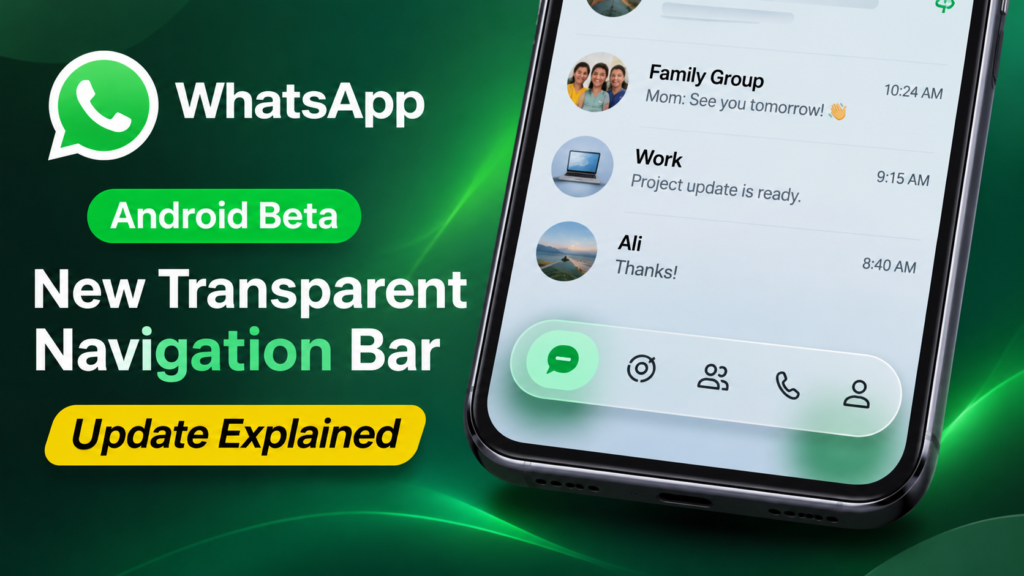
WhatsApp is working on a fresh visual update for its Android app, and the redesigned navigation bar is now reaching some beta testers. The new WhatsApp Android beta transparent navigation bar features a floating layout, rounded corners and a cleaner appearance that takes up less space on the screen.
The update is more than a simple cosmetic change. The navigation bar can shrink when users scroll through their chats and expand again when they move back up. WhatsApp has also removed the text labels from the navigation icons and introduced a softer visual effect to help the bar blend into the interface.
The redesigned feature was reported in November 2026 and is gradually becoming available through the Google Play beta programme. However, it has not yet been released to all Android users.
The WhatsApp Android beta transparent navigation bar is designed to give users a more spacious viewing experience. Its floating appearance and automatic resizing make the updated interface different from the traditional bottom navigation layout.
WhatsApp Android Beta Transparent Navigation Bar: What’s New?
The biggest change is the way the bottom navigation bar appears on the screen. Instead of extending across the bottom edge like the previous design, the new version sits slightly above it as a separate floating element.
Its rounded corners give it a more modern appearance, while the removal of text labels creates a cleaner layout. Users can still access the main sections through their familiar icons.
According to WABetaInfo, the updated design was spotted in WhatsApp beta for Android version 2.26.45.5. The feature is being rolled out gradually, which means some beta testers may see it while others continue using the existing navigation bar.
How the New Floating Navigation Bar Works

The redesigned navigation bar changes its size depending on how users interact with the app.
When someone scrolls down through the chat list, the bar gradually becomes smaller in both width and height. It turns into a compact floating pill while keeping the navigation icons visible.
When the user scrolls back up, the bar expands and returns to its full appearance.
This adjustment is intended to make better use of the available screen space. Instead of keeping a large navigation panel visible at all times, WhatsApp allows it to become less prominent while users browse their conversations. One of the most interesting features of the WhatsApp Android beta transparent navigation bar is its ability to adjust while scrolling. This design keeps the navigation controls accessible while reducing unnecessary screen space.
For people who regularly scroll through long chat lists, this could make the interface feel less crowded.
No More Text Labels Under Navigation Icons
Another noticeable change is the removal of text labels from the bottom navigation bar.
The previous design used both icons and labels to identify different sections. In the redesigned version, WhatsApp relies on icons alone.
The main navigation sections include:
- Chats: Access individual and group conversations.
- Updates: View status updates and channels.
- Contacts: Find people available on WhatsApp.
- Calls: Check call history and start new calls.
- You: Access personal settings and account-related options where this tab is available.
The exact arrangement may differ between accounts because WhatsApp is testing different navigation layouts.
Although removing labels gives the interface a simpler look, users who prefer written descriptions may need a little time to become familiar with the icon-only layout. The WhatsApp Android beta transparent navigation bar gives the main app sections a more compact appearance by replacing traditional text labels with recognisable icons.
What Does the Transparent or Blur Effect Look Like?
The new navigation bar also includes a progressive blur effect beneath it. This helps soften the transition between the floating panel and the content behind it.
Rather than appearing as a solid block with a sharp lower edge, the bar blends more naturally into the screen.
This is why some reports describe the update as a transparent navigation bar. However, it is more accurate to describe it as a floating navigation bar with a blur effect rather than a completely transparent panel.
The redesign also works with WhatsApp’s edge-to-edge interface, helping the app make better use of the available display area. The WhatsApp Android beta transparent navigation bar also introduces a softer visual experience through its blur effect. This gives the interface a modern appearance without making the navigation icons difficult to identify.

Selected Tab Gets a New Circular Highlight
WhatsApp has also changed the way it highlights the currently selected section.
Previously, the active tab used a pill-shaped indicator. In the updated design, a circular highlight appears around the selected icon.
The highlight uses WhatsApp’s default green accent colour. Reports also indicate that users with WhatsApp Plus may see their selected custom accent colour reflected in the navigation bar.
This small adjustment makes the active section easier to distinguish without bringing back the text labels.
Which Android Users Can Get the New Navigation Bar?
The redesigned navigation bar is currently being rolled out to some users through the WhatsApp beta programme on Google Play.
WABetaInfo reported its availability with WhatsApp beta for Android version 2.26.45.5. However, installing the latest beta does not guarantee that the feature will appear immediately.
WhatsApp often enables new features gradually through account-based rollouts. This means two people using the same app version may see different interfaces.
Android users who want to test upcoming WhatsApp features can check whether the beta programme has available places through the Google Play Store. Beta availability is limited, and users should only install beta software if they are comfortable testing features that may still change.
According to WABetaInfo’s latest report, the redesigned navigation bar is gradually reaching selected Android beta testers.
Android users can check the official WhatsApp listing on Google Play for available app updates and beta access.
The WhatsApp Android beta transparent navigation bar is not yet available to every tester. Its gradual rollout allows WhatsApp to evaluate the updated design before expanding availability to more Android users.
When Will WhatsApp Release the New Navigation Bar to Everyone?
WhatsApp has not announced an official public release date for the redesigned navigation bar.
For now, the feature is reaching selected beta testers. The company may continue adjusting its appearance and behaviour before making it available to a wider audience.
The final design could also change during testing. Users who do not see the floating bar should not assume that their app is outdated or that something is wrong with their phone.
The safest option is to keep WhatsApp updated through the official Google Play Store and wait for the feature to reach their account.
Users waiting for the WhatsApp Android beta transparent navigation bar should remember that beta features can change before their stable release. The final version may include further visual adjustments based on testing and feedback.
Why This WhatsApp Android Update Matters
Navigation is one of the most frequently used parts of a messaging app. Even a small design change can affect how comfortable an app feels during everyday use.
The new floating bar gives WhatsApp a cleaner appearance and makes more room for the content users are viewing. Its ability to shrink while scrolling is particularly useful because it reduces visual clutter without completely hiding the navigation controls.
The icon-only design may take some getting used to, but it also creates a more minimal interface. Overall, the update suggests that WhatsApp is continuing to refine the Android experience rather than limiting its design improvements to iPhone users.
The evolution of mobile apps is part of a wider technology shift. Read our coverage of Pakistan’s AI Future and the Emerging Intelligence Divide for more technology insights.
As smartphone technology continues to evolve, consumers are also watching device costs. Explore our report on AI and Technology Prices in 2026 to understand the latest industry trends.
Overall, the WhatsApp Android beta transparent navigation bar represents another step in WhatsApp’s Android interface redesign. Its floating layout, compact scrolling behaviour and updated icons could make everyday navigation more comfortable. With the WhatsApp Android beta transparent navigation bar, the company is exploring a cleaner way to organise its main app sections while giving conversations and updates more room on the display.
Conclusion
The new WhatsApp Android beta transparent navigation bar brings a floating layout, rounded corners, icon-only tabs, a circular selection highlight and a progressive blur effect. Its ability to shrink while scrolling is one of the most practical parts of the redesign.
For now, the feature is available only to selected Android beta testers, and WhatsApp has not confirmed when it will reach everyone. For Android users interested in upcoming app changes, the WhatsApp Android beta transparent navigation bar is one of the visual improvements worth watching. Users should keep an eye on future updates for more details about its wider release.
Frequently Asked Questions
1. What is the new WhatsApp Android beta navigation bar?
It is a redesigned bottom navigation bar with a floating layout, rounded corners, icon-only tabs and a blur effect.
2. Which WhatsApp beta version includes the new navigation bar?
The feature has been reported in WhatsApp beta for Android version 2.26.45.5.
3. Is the new WhatsApp navigation bar transparent?
It includes a progressive blur effect that helps it blend into the background. It is more accurately described as a floating bar with a blur effect.
4. Does the new navigation bar shrink when scrolling?
Yes. It gradually becomes smaller when users scroll down and expands again when they scroll up.
5. Why has WhatsApp removed the navigation labels?
The redesigned interface uses icons without text labels to create a simpler appearance and reduce the space occupied by the navigation bar.
6. Is the new navigation bar available to all Android users?
No. It is currently rolling out gradually to selected beta testers. A public release date has not been announced.
7. How can I get the new WhatsApp navigation bar?
You can check the Google Play Store for WhatsApp beta availability and keep your app updated. However, joining the beta does not guarantee immediate access because the rollout is gradual.
8. Will the new navigation bar also come to iPhone?
There is no confirmed release announcement for this particular Android redesign on iPhone. WhatsApp already has its own navigation design on iOS.