
WhatsApp scheduled messages are finally becoming available, giving users a convenient way to send messages at a chosen date and time instead of sending them immediately. Announced on November 25, 2026, this long-requested feature allows people to plan messages up to 14 days in advance.
Whether you want to remember someone’s birthday, send a work reminder, or share an important update in a group chat, the new feature could make everyday communication easier. It also works with photos and videos, while scheduled messages remain protected by WhatsApp’s end-to-end encryption.
Here is everything you need to know about the new feature, how it works, and when you can expect to use it.
What Are WhatsApp Scheduled Messages?
WhatsApp scheduled messages allow users to write a message now and choose a future time for it to be delivered automatically.
Previously, users who wanted to send a WhatsApp message later had to remember to open the app and send it manually or rely on third-party workarounds. The new built-in option removes much of that inconvenience.
According to WhatsApp, users can schedule messages from 10 minutes to 14 days ahead. The feature works in both individual conversations and group chats.
For example, you could write a birthday greeting several days before someone’s birthday and schedule it to arrive at the right time. You can also prepare a work update in advance rather than interrupting your day to send it later.
WhatsApp officially introduced this feature on November 25, 2026, describing it as one of its most requested updates. Read the official WhatsApp announcement.
For more technology updates, explore our latest technology news and updates on NuvWire.
Key Features of WhatsApp Message Scheduling

The new feature brings several useful options to WhatsApp users.
1. Schedule Messages Up to 14 Days Ahead
Users can select a future date and time for a message. The scheduling window starts at 10 minutes and extends up to 14 days.
This gives people more flexibility when planning reminders, greetings, announcements and other messages.
2. Works in Individual and Group Chats
WhatsApp scheduled messages are supported in one-to-one conversations as well as group chats.
This could be particularly useful for families, friends, colleagues, students and community groups that regularly share reminders or announcements.
3. Supports Text, Photos and Videos
The feature is not limited to ordinary text messages. WhatsApp also supports scheduling photos and videos.
This means users can prepare different types of content in advance instead of waiting until the exact moment they want to share it.
4. Messages Can Be Sent Even When Your Phone Is Off
One of the most convenient aspects is that a scheduled message can still be delivered at the selected time even if the sender’s phone is switched off or out of battery.
Users do not need to keep WhatsApp open or leave their phones running just to make sure a scheduled message is delivered.
5. Review or Delete Scheduled Messages
Plans can change, and WhatsApp provides a way to manage scheduled messages before they are sent.
Users can view their upcoming messages and delete a scheduled message if they no longer want it delivered.
6. End-to-End Encryption Remains Available
WhatsApp says scheduled messages remain protected by its end-to-end encryption.
This means the messages retain the same core privacy protection as regular personal messages, so their contents are not readable by WhatsApp itself.
According to The Verge’s report on WhatsApp scheduled messages, the feature supports individual chats, group conversations, and media sharing.
How to Schedule a Message on WhatsApp
Using the new feature is designed to be straightforward. Once it becomes available on your account, follow these steps:
- Open WhatsApp on your Android phone or iPhone.
- Open the individual or group chat where you want to send a message.
- Type the message you want to send.
- Press and hold the send button.
- Choose the date and time when you want the message delivered.
- Review your selection and confirm the schedule.
Your message will then be placed in the scheduled messages list and sent at the selected time.
The recipient will see it like a regular WhatsApp message.
Important: The scheduling option may not appear on every account immediately because WhatsApp is rolling out the feature globally over the coming weeks.
For more information about the feature’s rollout and functionality, see 9to5Mac’s WhatsApp feature coverage.
Why Is This Feature Useful?
The ability to schedule messages may seem like a small change, but it can solve several everyday communication problems.
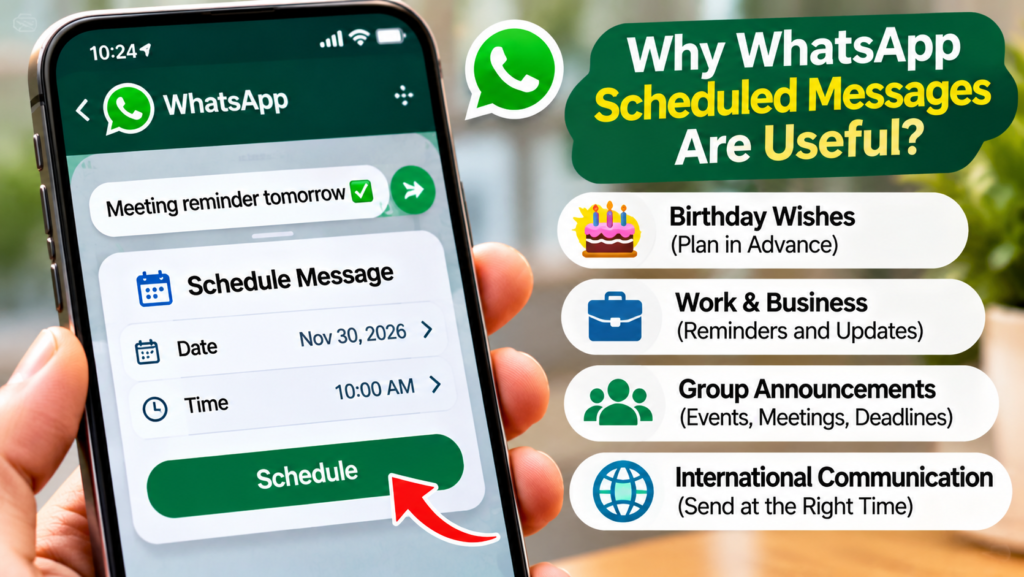
Here are some practical examples:
Birthday Wishes and Special Occasions
People often remember birthdays at inconvenient times. With message scheduling, users can prepare a greeting in advance and choose when it should arrive.
Work and Business Communication
Business owners, freelancers and office workers can prepare customer updates, reminders and routine messages ahead of time.
For example, a business could prepare an announcement in advance instead of having someone manually send it at a specific hour.
Group Announcements
Group administrators and members can use scheduled messages to plan reminders about meetings, events, deadlines and other important activities.
International Communication
People communicating across different time zones may find scheduling especially helpful. They can prepare a message at a convenient time and arrange for it to arrive later.
Is WhatsApp Scheduled Messaging Available for Everyone?
WhatsApp announced that scheduled messages are rolling out globally over the coming weeks.
This means some users may receive the feature before others. If you cannot find the scheduling option, it does not necessarily mean your phone is incompatible.
To improve your chances of receiving the feature:
- Keep WhatsApp updated through the official Google Play Store or Apple App Store.
- Check the send-button options inside a chat.
- Look for the feature again as the rollout continues.
- Avoid downloading unofficial WhatsApp applications that claim to unlock new features.
Availability can depend on the rollout reaching your account, so users may need to wait for the option to appear.
You can also follow WhatsApp’s official channel for announcements about new features and updates.

What Does This Mean for WhatsApp’s Future?
WhatsApp has become an important communication platform for personal conversations, family groups and business interactions. Adding scheduled messages makes it more useful for people who want to manage their communication in advance.
The feature also brings WhatsApp closer to the scheduling options already available in some competing messaging services.
For businesses, it could make routine communication easier. For ordinary users, it offers a simple way to remember important messages without relying on alarms or external scheduling applications.
However, the feature is not a replacement for a complete business messaging platform. Users who need advanced campaign scheduling, customer management or automated marketing workflows may still require dedicated business tools.
Final Thoughts
The arrival of WhatsApp scheduled messages is a useful improvement for people who rely on the app every day. Being able to schedule texts, photos and videos up to 14 days ahead could make personal and professional communication more organized.
The ability to manage upcoming messages, send them even when a phone is switched off, and retain end-to-end encryption makes the feature particularly practical.
As the global rollout continues, more users should get the opportunity to try it. For anyone who has ever forgotten an important birthday greeting or a work reminder, this could become one of WhatsApp’s most useful additions.
Frequently Asked Questions (FAQs)
1. What are WhatsApp scheduled messages?
WhatsApp scheduled messages allow users to write a message and choose a future date and time for automatic delivery.
2. How far in advance can I schedule a WhatsApp message?
Users can schedule messages from 10 minutes up to 14 days in advance.
3. Can I schedule messages in WhatsApp group chats?
Yes. The feature supports both individual conversations and group chats.
4. Can I schedule photos and videos on WhatsApp?
Yes. WhatsApp scheduled messages support text, photos and videos.
5. Will a scheduled WhatsApp message send if my phone is off?
Yes. According to WhatsApp, scheduled messages can still be delivered at the selected time even when the sender’s phone is switched off or out of battery.
6. Can I cancel a scheduled WhatsApp message?
Yes. You can review upcoming scheduled messages and delete them before they are sent.
7. Are WhatsApp scheduled messages end-to-end encrypted?
Yes. WhatsApp says scheduled messages remain protected by end-to-end encryption.
8. Why can’t I see the scheduled messages feature on my WhatsApp?
The feature is rolling out globally over the coming weeks. Update WhatsApp through the official app store and check again later if the option is not yet available.
9. Does the recipient know that a WhatsApp message was scheduled?
The scheduled message appears like a regular message to the recipient.
10. Is WhatsApp scheduled messaging available on Android and iPhone?
WhatsApp has announced a global rollout. Availability may vary while the feature reaches users’ accounts.