
Think about how much of your life is connected to the internet. You probably use your phone to chat with friends, check your bank balance, shop online, watch videos, and manage important accounts. These activities make everyday life easier, but they also leave personal information scattered across websites, apps, and digital services.
Your email address, phone number, photographs, location, passwords, and financial details can become valuable targets for cybercriminals. Sometimes, a single careless click or an exposed password is enough to put an account at risk.
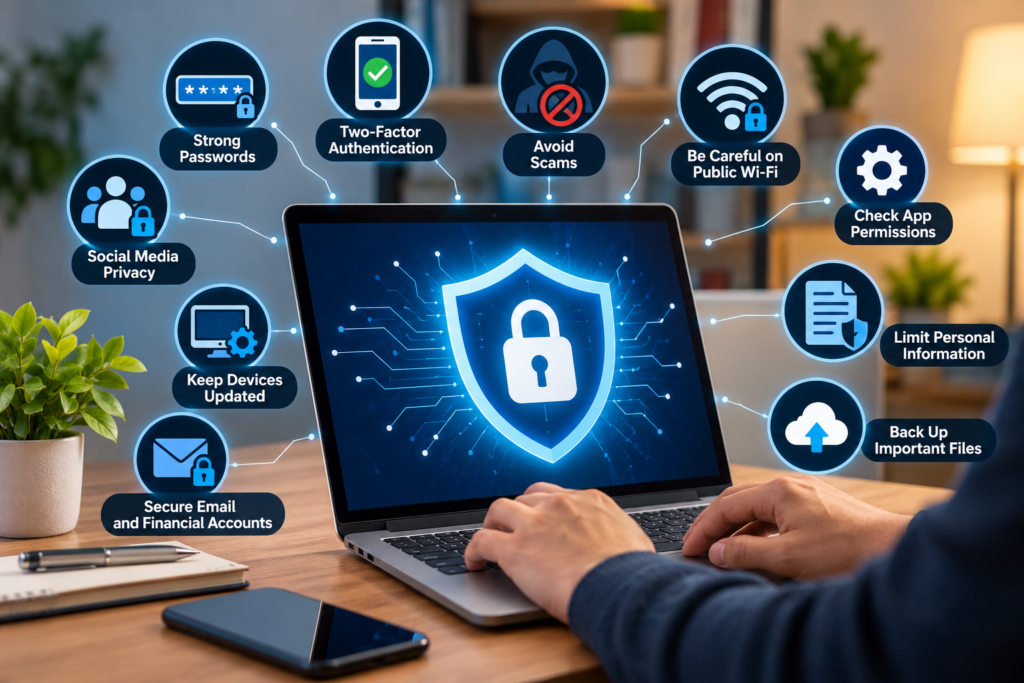
The good news is that protecting yourself does not require advanced technical knowledge. A few practical habits can make a meaningful difference.
If you want to understand how to protect your personal information online, this guide explains 11 useful steps you can start following today. Whether you are a student, employee, freelancer, business owner, or casual internet user, these tips can help you make safer decisions online.
Learning how to protect your personal information online starts with small daily habits, such as checking website security, limiting data sharing, and using trusted applications.
The best way to protect your personal information online is to build simple security habits that you can follow every day.
How to Protect Your Personal Information Online in 2026
The internet has become part of almost every aspect of modern life. People use digital services to work, study, communicate, make payments, and store personal memories.
However, the information we share can sometimes travel further than expected. Apps may request unnecessary permissions, websites may collect browsing information, and scammers may use leaked personal details to make fraudulent messages appear convincing.
Artificial intelligence has introduced additional challenges. Criminals can use personal information to create more believable phishing messages, imitate familiar people, or build convincing fake identities.
Online privacy is not just about hiding secrets. It is about maintaining control over your information, reducing unnecessary exposure, and deciding who should have access to your digital life.
Understanding how to protect your personal information online can help you reduce privacy risks and make safer decisions when using digital services.
Online privacy is closely connected to website security. If you want to learn more about protecting websites from digital threats, read our guide on critical PHP security vulnerabilities and essential fixes.
1. Use Strong and Unique Passwords for Every Account
A weak password can make it easier for someone to access your account. Using the same password everywhere creates an even bigger problem.
Imagine that a shopping website suffers a data breach. If you use the same password for your email, social media, and banking accounts, a criminal who obtains those credentials may try them on other services.
This is why every important account should have its own password.
A long, unique password or passphrase is generally a better choice than a short, predictable combination. Avoid using obvious details such as your birthday, name, or common phrases.
A reputable password manager can help you create and store unique passwords without forcing you to remember every combination.
An important step in learning how to protect your personal information online is to create unique passwords that keep each account secure.
Practical tip: Start with your primary email account. It may be used to reset passwords for many of your other accounts, making it especially important to secure.
2. Enable Two-Factor Authentication
A strong password is important, but it is not always enough. Two-factor authentication, also called 2FA, adds another verification step when you sign in.
Depending on the service, this could involve an authenticator app, a security key, or a code sent to your device.
For example, even if someone discovers your password, an additional authentication requirement may prevent them from signing in.
Where available, consider using a passkey or a hardware security key for important accounts. Authenticator apps can also provide strong protection. Text-message verification is generally better than having no additional protection, although it has weaknesses such as risks associated with phone-number takeover.
Never share a one-time verification code with someone who contacts you unexpectedly.
Practical tip: Enable additional authentication on your email, financial accounts, social media profiles, and any service containing sensitive personal information.
Another useful way to learn how to protect your personal information online is to add an extra layer of security to your most important accounts.
3. Review Your Social Media Privacy Settings
Social media makes it easy to share photographs, opinions, achievements, and everyday moments. However, sharing too much information can reveal details that you would prefer to keep private.
A public photograph might show your home address in the background. A holiday announcement could reveal that your home is empty. Regular posts may also expose your routines or the names of people close to you.
You do not need to stop using social media to protect your privacy. Instead, think carefully about what you share and who can see it.
Review your account settings and limit access to personal posts when appropriate. Remove unfamiliar followers, check old public posts, and avoid publishing sensitive documents or identification details.
Be cautious about sharing your live location, travel plans, workplace information, or information about children.
Practical tip: Before posting, ask yourself whether you would be comfortable with a stranger saving the information and viewing it months or years later.
Reviewing your privacy settings is a practical way to learn how to protect your personal information online.
4. Recognize Phishing Emails, Messages, and Fake Websites
Phishing is a common method criminals use to trick people into revealing sensitive information.
You might receive an email claiming that your bank account has been suspended or a text message saying that a package cannot be delivered. The message may contain a link to a fake website designed to collect your password or payment details.
Some fraudulent messages look professional and may use your name, familiar logos, or convincing language.
Instead of reacting immediately, examine the request carefully. Unexpected urgency, unusual payment instructions, suspicious links, and requests for confidential information deserve extra attention.
If a message claims to come from your bank, delivery company, or another service, open its official app or enter its known website address yourself. Do not rely on the link provided in the message.
Knowing how to protect your personal information online also means checking suspicious messages before clicking links or sharing sensitive details.
Practical tip: If a message pressures you to act immediately, pause. Taking a minute to verify the request can prevent a much bigger problem.
5. Be Careful With Public Wi-Fi Networks
Public Wi-Fi is convenient when you are at an airport, hotel, café, or shopping centre. However, you should not automatically assume that every available network is trustworthy.
Criminals may create fake Wi-Fi hotspots with names that resemble legitimate networks. Other network weaknesses can also expose users to privacy risks.
When connecting to public Wi-Fi, confirm the correct network name with the venue if necessary. Keep your device updated, use secure HTTPS websites, and avoid installing unfamiliar certificates or software requested by a network.
A reputable VPN can help protect network traffic in certain situations, but it does not make every online activity safe or prevent phishing, malicious downloads, and account theft.
For highly sensitive transactions, consider using your mobile data connection instead of an unfamiliar public network.
Practical tip: Turn off automatic connection to unknown Wi-Fi networks so your phone or laptop does not join unfamiliar hotspots without your knowledge.
If you want to protect your personal information online while travelling, avoid unfamiliar networks and verify sensitive websites before entering account details.
Knowing how to protect your personal information online helps you make safer choices when connecting to unfamiliar networks.
6. Keep Your Phone, Computer, and Apps Updated
Software updates do more than introduce new features. They often fix security weaknesses that attackers could exploit.
An outdated phone, browser, laptop, or application may contain vulnerabilities that have already been discovered by security researchers or criminals.
Enable automatic updates when practical, particularly for your operating system, web browser, and security software. Remove applications you no longer use, especially those that have stopped receiving updates.
Download apps from official stores or the software developer’s verified website. Avoid modified applications from unknown sources because they may contain malicious code.
If a device no longer receives security updates, consider replacing it when your budget allows, particularly if you use it for banking, work, or storing sensitive information.
Practical tip: Set aside a few minutes each week to check whether important devices and applications are up to date.
Keeping your software updated is an important part of knowing how to protect your personal information online against preventable security risks.
7. Check App Permissions Before Sharing Your Data
Many applications request access to your camera, microphone, contacts, photos, location, or files.
Some permissions are necessary for an app to function. A navigation app, for example, may need location access to provide directions. A simple calculator usually has no obvious reason to access your contacts.
When an application requests permission, consider whether that access is necessary for the feature you want to use.
Review your phone’s privacy settings and remove permissions that are no longer needed. Where supported, allow access only while an app is in use rather than granting permanent access.
Be particularly careful with applications that request extensive access without explaining why.
To protect your personal information online, give apps access only to the features they genuinely need.
Practical tip: Check your location, microphone, camera, and contact permissions regularly. You may discover that some apps have access they no longer need.
8. Limit the Personal Information You Share Online
Every extra detail you publish can increase your digital footprint.
Your full date of birth, home address, phone number, workplace, family details, and answers to common security questions may help someone build a profile about you.
This information can sometimes be combined with publicly available records or data from previous breaches to make impersonation attempts more convincing.
Before filling out an online form, ask whether the requested information is genuinely necessary. If a service does not need your exact location or birthday, avoid providing additional details without a clear reason.
Be cautious with online quizzes that ask personal questions, particularly when those questions resemble account recovery questions.
You should also avoid posting photographs of passports, identity cards, boarding passes, financial documents, or other records containing sensitive details.
Practical tip: Share the minimum information required to use a service. Less unnecessary data can mean less information available for misuse.
You can protect your personal information online by sharing fewer private details and checking how websites use the data you provide.
Knowing how to protect your personal information online starts with sharing only what is necessary. Review privacy settings regularly and avoid giving unfamiliar websites access to sensitive details.
9. Learn How to Recognize AI-Powered Scams
Artificial intelligence can help criminals produce convincing messages, imitate voices, and create manipulated images or videos.
A scammer might pretend to be a relative who urgently needs money or an employer asking you to make an unexpected payment. The message may sound familiar and include details that appear genuine.
This makes it increasingly important to verify unusual requests instead of relying only on how a message sounds or looks.
If someone calls claiming to be a family member in an emergency, contact that person using a trusted phone number. You can also agree on a private family verification phrase for unexpected emergency requests.
For workplace payments or changes to bank details, follow established approval procedures and confirm the request through a separate communication channel.
Never disclose passwords, one-time codes, or financial information simply because a caller appears to know you.
Practical tip: Familiar voices, profile photographs, and realistic messages are not conclusive proof of identity. Verify first, especially when money or confidential information is involved.
For additional guidance on protecting your digital privacy, visit the official CISA cybersecurity resource (https://www.cisa.gov/secure-our-world). You can also learn about identity theft prevention and online security through the Federal Trade Commission’s consumer advice (https://consumer.ftc.gov/identity-theft-and-online-security). If you encounter online fraud, the FBI Internet Crime Complaint Center (https://www.ic3.gov/) provides information about reporting cybercrime.
10. Secure Your Email and Financial Accounts
Your email account is often the key to your digital identity. It may contain private conversations, receipts, account notifications, and password reset messages.
If someone gains control of your email, they may attempt to access other services connected to it.
Use a unique password and enable additional authentication. Review account recovery methods, check for unfamiliar login sessions, and remove devices you no longer recognize.
Apply similar precautions to financial accounts. Enable transaction notifications, use official banking applications, and review account activity regularly.
Never give a caller your banking PIN, password, or one-time verification code. If you receive an unexpected message about a financial problem, contact your bank using the official number listed on its website, card, or application.
People who understand how to protect their personal information online are better prepared to recognize suspicious account activity and respond quickly.
If you notice an unfamiliar transaction, contact your bank immediately and follow its instructions.
Practical tip: Secure your primary email account first, then review the security settings of your financial and shopping accounts.
These trusted resources can help readers make better decisions about protecting their personal information.
11. Back Up Important Files and Review Your Digital Footprint
Online safety also means preparing for problems before they happen.
A device can be lost, damaged, stolen, or infected with malicious software. Without a backup, important photographs, work documents, and personal files may become difficult or impossible to recover.
Back up important information to a trusted cloud service or an external storage device. For particularly important files, consider maintaining a separate backup that is disconnected from your everyday devices.
Protect backups with strong authentication and encryption where available.
You should also review your digital footprint from time to time. Search for your name and check which profiles, photographs, or personal details are publicly visible. Review old accounts you no longer use and close unnecessary ones after saving any information you need.
Regular backups and privacy reviews help you protect your personal information online and reduce avoidable risks.
Practical tip: Create a regular backup schedule and review your online accounts every few months rather than waiting until something goes wrong.
Regular backups support your efforts to protect your personal information online by helping you recover important files after device failure or certain cyberattacks.
Common Online Privacy Mistakes to Avoid
Even people who understand cybersecurity can make mistakes when they are busy or distracted. A few habits are particularly worth avoiding.
- Using one password for multiple accounts.
- Clicking unexpected links without checking the destination.
- Sharing verification codes with callers or strangers.
- Installing applications from untrusted sources.
- Giving every app unrestricted access to personal information.
- Posting sensitive documents on social media.
- Ignoring security updates for long periods.
- Assuming a familiar voice or profile picture proves someone’s identity.
You do not need to change every digital habit overnight. Start with the most important accounts and gradually improve the way you manage your information.
What Should You Do If Your Personal Information Is Exposed?
Discovering that your information has been leaked or misused can be worrying. Acting quickly and following the right steps may reduce further damage.
First, identify what information may have been exposed. A leaked email address requires a different response from a compromised banking account or stolen identity document.
If a password has been exposed, change it immediately on the affected service and anywhere else you mistakenly reused it. Secure your email account and enable additional authentication.
If your financial information may have been compromised, contact your bank or payment provider through official channels. Ask about securing the account, blocking unauthorized transactions, and replacing affected cards if necessary.
Review recent account activity and sign out unfamiliar sessions. If someone has taken over an account, use the service’s official account recovery process.
Preserve relevant messages, screenshots, and transaction records. Report suspected fraud to the appropriate platform and the relevant authorities in your country.
Be cautious of anyone who promises guaranteed recovery of stolen money in exchange for an upfront fee. People who have already experienced fraud may be targeted by additional scams.
Frequently Asked Questions
1. How can I protect my personal information online?
Use unique passwords, enable two-factor authentication, review privacy settings, update your devices, avoid suspicious links, and limit the personal information you share publicly. These habits can reduce the risk of account theft and online fraud.
Following these simple practices is a practical way to learn how to protect your personal information online every day.
2. What personal information should I never share online?
Avoid publicly sharing passwords, banking PINs, one-time verification codes, private identification documents, and sensitive financial details. Only provide personal information to services when it is necessary and you have verified that the service is legitimate.
3. Is public Wi-Fi safe for online banking?
Public Wi-Fi is not automatically unsafe, but unfamiliar networks can carry risks. Prefer mobile data for sensitive transactions when practical, use official banking apps, and ensure your device is updated. A VPN does not eliminate every security threat.
4. How do I know if my personal information has been stolen?
Possible warning signs include unfamiliar account logins, unexpected password reset messages, transactions you did not authorize, or notifications about accounts you did not create. These signs do not always prove identity theft, but they deserve immediate investigation.
5. Can a VPN protect all my personal information?
No. A VPN can help protect certain network traffic and conceal your IP address from some observers, but it cannot stop every scam, malicious application, or data breach. Strong account security and careful online behavior remain essential.
6. How can I protect my privacy on social media?
Limit the audience for personal posts, review app permissions, avoid publishing sensitive information, disable unnecessary location sharing, and be selective about friend or follower requests. Remember that someone who can view a post may be able to save or copy it.
7. Why is two-factor authentication important?
Two-factor authentication adds another verification step beyond your password. This can make unauthorized access more difficult if someone obtains your login credentials.
8. How often should I review my online security?
Review your important accounts and privacy settings every few months. Install security updates promptly and check account activity regularly. If you suspect a breach, take action immediately rather than waiting for your next review.
Final Thoughts
Protecting your personal information online does not require you to avoid technology or become a cybersecurity expert. It starts with understanding what you share, recognizing suspicious behavior, and making safer choices when using digital services.
Use strong, unique passwords, enable additional authentication, keep your devices updated, and think carefully before clicking unexpected links. Give apps only the permissions they need, and verify unusual requests before sending money or revealing sensitive details.
Most importantly, make online privacy a regular habit rather than something you consider only after a problem occurs.
Ultimately, learning how to protect your personal information online helps you build safer digital habits and maintain greater control over your privacy.
Your personal information is part of your digital identity. Taking a few minutes to secure it today can help you avoid unnecessary risks tomorrow.
The best way to protect your personal information online is to combine strong account security, careful sharing, and regular privacy checks.
Learning how to protect your personal information online is an ongoing process that helps you adapt to new digital risks and keep your accounts safer.
If you want to know how to protect your personal information online, start by securing your accounts, limiting what you share, and checking your privacy settings regularly.
Stay alert, protect your accounts, and make your privacy a priority every time you go online.
For more practical advice on online safety, explore the official resources from CISA, which offers guidance on securing accounts and recognizing cyber threats. The Federal Trade Commission also provides helpful information about identity theft and online security. These trusted resources can help readers make better decisions about protecting their personal information.