Website security is something many people think about only after a problem occurs. A website may load normally, display articles, and serve customers without any obvious warning signs. Behind the scenes, however, a vulnerability in its software can create an opportunity for attackers.
That concern has become especially important this week. On October 21, 2026, the PHP development team released security updates addressing two critical vulnerabilities. Cybersecurity authorities have warned organizations to take the issue seriously, and reports describe websites being temporarily taken offline while operators worked to protect their systems.
These PHP security vulnerabilities matter because PHP runs a wide range of websites and web applications. Website owners, hosting providers, developers, and businesses should understand what happened, why it matters, and what steps they can take now.
The latest PHP security vulnerabilities highlight why regular website maintenance is essential in 2026. Website owners should check their PHP versions, review official security advisories, and install the appropriate patches. Addressing PHP security vulnerabilities promptly can help reduce exposure to attacks and protect important website data.
What Are the Latest PHP Security Vulnerabilities?
PHP is a programming language commonly used to build dynamic websites, web applications, and server-side features. Popular website platforms and many custom-built services rely on PHP in some form.
The latest security alert concerns two vulnerabilities identified as CVE-2026-109618 and CVE-2026-109619. According to cybersecurity authorities, these flaws could allow an attacker to execute code remotely on an affected server without first authenticating.
In simple terms, a vulnerable server could potentially allow an attacker to run unauthorized commands. Depending on the server’s configuration and the attacker’s access, this could put website files, application data, and other connected systems at risk.
The PHP team has released patched versions, and its official guidance strongly encourages affected users to update immediately.
Website owners should avoid assuming that a site is safe simply because it is working normally. Security vulnerabilities can exist without producing visible symptoms for visitors.
Why PHP Security Vulnerabilities Need Immediate Attention
PHP security vulnerabilities can put websites at risk when administrators delay essential software updates. Website owners should check their installed PHP version, review official security advisories, and confirm that the correct patches have been applied. Taking these precautions can help protect website files and reduce the risk of unauthorized access.
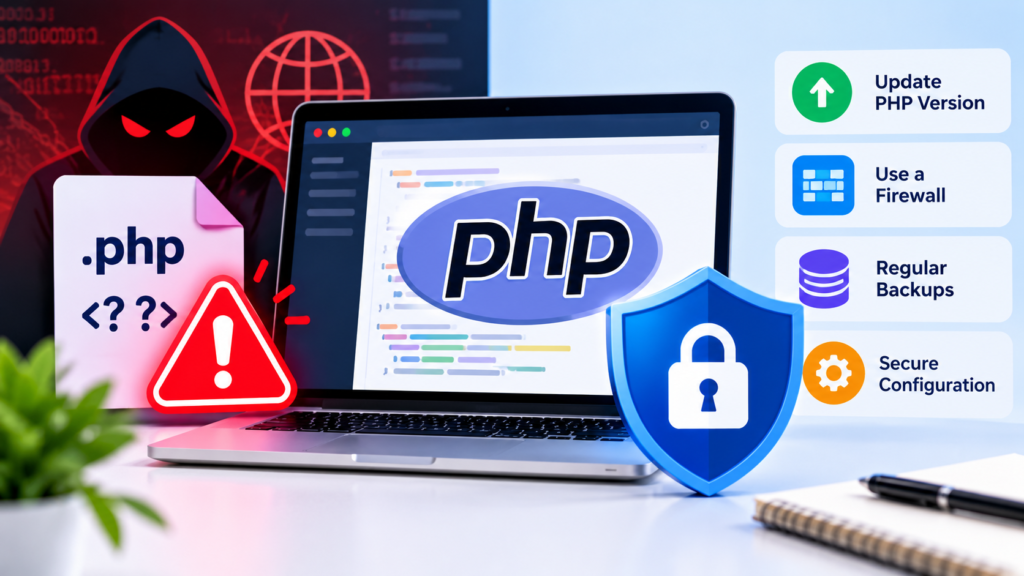
Why Are These PHP Security Vulnerabilities So Serious?
The main concern is the possibility of remote code execution. This category of vulnerability can be particularly dangerous because an attacker may be able to interact with a server in ways the website owner never intended.
The potential consequences depend on the software, configuration, and permissions involved.
1. Unauthorized Access to Website Files
If an attacker gains sufficient access through a vulnerable service, important website files could be exposed, modified, or deleted. That may affect published content, configuration files, or other resources stored on the server.
2. Exposure of Sensitive Information
Some websites process customer details, contact information, account records, or business documents. A compromised server could place this information at risk, depending on the attacker’s access and the application’s security controls.
3. Malware and Suspicious Redirects
Attackers sometimes modify websites to distribute malicious files, inject unwanted code, or redirect visitors to deceptive pages. A website owner may not notice these changes immediately.
4. Business Disruption
A compromised website can lose availability, damage customer trust, and require time-consuming recovery work. Online stores and service businesses may also face lost sales while their systems are being investigated.
These are potential consequences of serious server vulnerabilities, not confirmation that every affected website has been compromised.
Why Have Some Websites Been Taken Offline?
Several organizations have temporarily disabled websites or services as a precaution while addressing the PHP security issue. Reuters reported that government, educational, healthcare, and corporate websites in multiple countries were affected by precautionary shutdowns and security work.
Taking a website offline can reduce exposure when an organization cannot apply a necessary fix quickly enough. However, it is not a permanent solution. The priority is to identify affected systems, apply the correct updates, and verify that they are secure before restoring normal service.
This situation also highlights an important lesson: website availability and website security are not always the same thing. A site can be accessible to visitors while still requiring an urgent security update.
Which PHP Versions Should Website Owners Check?
The PHP development team has published security updates for several maintained branches, including the following versions:
- PHP 8.5.12
- PHP 8.4.27
- PHP 8.3.36
- PHP 8.2.35
These releases address the vulnerabilities discussed in the current advisory. Administrators should consult the official PHP security announcements to confirm the appropriate fixed version for their particular installation.
Do not assume that installing a new version of a website theme or plugin automatically updates the PHP runtime on your server. These are separate components and may require separate updates.
Older or unsupported PHP installations need particular attention. If your server uses a version that does not receive the relevant security fix, speak with your hosting provider or developer about a supported upgrade or another appropriate mitigation.
7 Essential Steps to Protect Your Website
If you own a website or manage a server, use the following checklist to reduce risk.
1. Check Which PHP Version Your Website Uses
Log in to your hosting control panel and locate the PHP version setting. If you manage your own server, ask your administrator to identify every PHP installation, including those used by separate applications.
Do not assume that every website on the same hosting account uses an identical configuration.
2. Install the Appropriate Security Update
Apply the fixed PHP release that matches your installation and supported branch. If you use managed hosting, contact the provider to confirm that the affected runtime has been patched.
For production websites, arrange the update carefully so that essential applications continue to function correctly.
3. Update Related Software
PHP may also be bundled with third-party products, appliances, and services. A software update to one component does not necessarily fix every other component that contains its own PHP installation.
Check vendor advisories for your content management system, hosting environment, security appliances, and other relevant services.
4. Back Up Important Website Data
Before making major changes, maintain a recent backup of your website files, database, and necessary configuration. Confirm that the backup can be restored.
A backup is not a substitute for patching, but it can make recovery easier if an update causes compatibility problems or an investigation reveals damage.
5. Review Server Logs for Unusual Activity
Look for unexpected requests, unfamiliar administrative activity, unusual file changes, and other indicators that warrant investigation. Security teams should compare suspicious events with the timing and nature of the vulnerability.
Do not assume that installing a patch automatically removes an attacker who may already have gained access.
6. Strengthen Account Security
Use unique passwords, enable multifactor authentication where available, and limit administrative access to people who need it. Remove outdated accounts and review unnecessary permissions.
These practices will not repair the PHP vulnerability itself, but they help reduce other avenues of attack.
7. Confirm the Fix and Continue Monitoring
After patching, verify the installed version and check that the application works as expected. Continue monitoring security alerts and investigate any evidence of unauthorized access.
If you suspect a compromise, involve a qualified security professional. Simply restoring the website without investigating suspicious activity could leave the original problem unresolved.
What Should WordPress Website Owners Do?
WordPress users should pay attention because WordPress commonly relies on PHP to run its server-side functionality. However, the presence of WordPress alone does not establish whether a particular installation is affected. The actual PHP runtime and any bundled components must be checked.
Start by contacting your hosting provider or checking the PHP version displayed in your hosting control panel. Confirm whether the provider has applied the appropriate security update.
Then review WordPress core, themes, and plugins for their own available security updates. Keep administrator access restricted and maintain a reliable backup.
If you cannot verify whether the PHP runtime has been patched, ask your hosting company directly. A quick confirmation is better than assuming that the issue has been handled automatically.
Website security also means staying alert to online scams and other digital threats. Read our guide on AI Voice Scams in 2026 to learn more about recognizing online threats and protecting yourself from cybercriminals.
How Hosting Providers Can Help
Hosting providers play an important role in addressing PHP security vulnerabilities. They can help customers identify affected PHP versions, apply available security updates, and investigate unusual server activity. If you manage a website through shared hosting, contact your provider to confirm whether your environment requires an update.
What If You Cannot Update PHP Immediately?
Treat an unpatched, internet-facing system as a priority.
Organizations should contact their hosting provider or technical team to establish the safest temporary mitigation. Depending on the environment, this may involve restricting access, isolating the affected service, or temporarily taking it offline until the required fix can be applied.
There is no single temporary workaround that is appropriate for every installation. Follow the official advisory and the guidance of the vendor responsible for your software.
For businesses that handle sensitive data, delaying action without assessing the exposure can increase risk. Document the steps taken and confirm that the final remediation is complete.
How to Reduce Risks From PHP Security Vulnerabilities
PHP security vulnerabilities can create serious risks when website software remains unpatched. Check your hosting environment, install supported security updates, and review server logs for suspicious activity. These practical steps can help you respond quickly and strengthen your website’s overall security.
What This Incident Means for Website Security in 2026
The latest PHP alert is a reminder that website security depends on the software running behind the pages people see. A professional design, secure password, and trusted hosting company are valuable, but none can replace timely security updates.
It also demonstrates why organizations need an established patching process rather than relying on occasional maintenance. Knowing which software is installed, who is responsible for updating it, and how to respond to an urgent advisory can make a meaningful difference when a critical issue emerges.
Small website owners should take the warning seriously without assuming that their sites have already been attacked. The most useful response is to verify the environment, apply the appropriate fix, and investigate any credible signs of compromise.
Understanding PHP security vulnerabilities is an important part of protecting any website that relies on PHP. Keep your software updated, follow trusted security announcements, and contact your hosting provider if you are unsure whether your server is protected.
Keep Your Website Protected
Regular maintenance is one of the most effective ways to manage PHP security vulnerabilities. Keep supported software updated, maintain reliable backups, use strong authentication, and monitor your website for suspicious changes. If you suspect a compromise, seek professional assistance instead of relying on a software update alone.
For more information about PHP security vulnerabilities, review the recommendations and protection steps explained throughout this guide. Website owners should keep their software updated, monitor suspicious activity, and follow official security advisories to reduce potential risks.
Website owners should also review the official PHP security advisories to understand available fixes and protect their systems against known vulnerabilities. Regular updates and security checks are essential for maintaining a safer website.
Final Thoughts
The current PHP security alert deserves prompt attention from website owners, developers, and businesses that depend on online services. Two critical vulnerabilities have led to urgent security guidance, and fixed PHP releases are available for several maintained branches.
If you manage a website, check your PHP version, coordinate with your hosting provider, install the appropriate security update, and review your systems for suspicious activity. If your software is unsupported or you cannot confirm that the vulnerability has been addressed, seek technical assistance promptly.
For more information about website security, visit our website’s homepage and explore the latest technology updates, online safety advice, and cybersecurity news.
The best time to improve website security is before an attacker finds a weakness. Staying informed and maintaining software properly can help protect your website, your visitors, and the trust you have worked hard to build.
Official Sources and Further Reading
- PHP security releases: https://www.php.net/
- European Union Agency for Cybersecurity (ENISA): https://www.enisa.europa.eu/news/joint-statement-on-critical-php-vulnerabilities
- New Zealand National Cyber Security Centre: https://www.ncsc.govt.nz/alerts/cve-2026-109618-and-cve-2026-109619-affecting-php/
- Reuters coverage: https://www.reuters.com/technology/websites-taken-offline-over-php-risks-2026-10-21/
This article is for general informational purposes. Website administrators should follow the official guidance applicable to their specific software and hosting environment.