The way we use the internet is changing quickly. A few years ago, browsing usually meant opening websites, typing searches, and completing tasks ourselves. Today, AI-powered browsers and assistants can summarize articles, compare products, organize information, and help users complete several online tasks with less effort.
These features can save time, but they also raise an important question: how much access should an AI assistant have to our digital lives?
When an AI tool can interact with websites, read page content, or perform actions on behalf of a user, a simple mistake can have consequences beyond an incorrect answer. Depending on its permissions, an assistant might encounter private information, interact with a logged-in account, or follow misleading instructions hidden inside a webpage.
Understanding AI browser security risks can help individuals and businesses enjoy the benefits of modern browsing without overlooking their privacy.
In this guide, we will explore nine important security concerns, explain how they can affect everyday users, and share practical steps to reduce unnecessary risks.
Understanding AI browser security risks is essential for anyone who uses artificial intelligence to browse the internet. These AI browser security risks can include privacy exposure, malicious website instructions, and unauthorized actions. Learning how to identify AI browser security risks helps users make safer decisions while enjoying the convenience of AI-powered technology.
What Are AI Browser Security Risks?
AI browser security risks are potential threats to privacy, accounts, and personal information that arise when artificial intelligence interacts with browser content or performs online tasks.
A traditional browser mainly displays websites and lets users control their actions. An AI-enabled browser may also interpret requests, summarize information, navigate between pages, or carry out a sequence of actions. The exact capabilities depend on the product.
For example, imagine asking an AI assistant to compare three laptops. It might visit several websites, examine product specifications, and prepare a comparison. That is convenient.
However, if the assistant has excessive permissions or encounters a malicious website, the same automation could create an opportunity for unwanted access or unintended actions.
The problem is not that every AI browser is dangerous. The real concern is that greater automation can introduce new ways for mistakes, malicious instructions, and poor security settings to affect users.
Understanding AI browser security risks also means recognizing that not every threat comes from hackers. Excessive permissions, poorly configured extensions, and accidental sharing of sensitive information can create problems too. By identifying these risks early, users can make informed choices about which AI features to enable.
Why AI Browser Security Matters in 2026
AI tools are becoming more integrated into everyday browsing, research, shopping, and business activities. As their capabilities expand, security must account for both conventional browser threats and risks associated with AI decision-making.
Research published by the University of Washington in 2026 examined security weaknesses in AI-enabled browsers. The findings highlighted how malicious webpage content and browser-agent behavior can create opportunities for attacks when security boundaries are inadequate.
You can read the research coverage from the University of Washington.
This research does not mean every AI browser has the same weaknesses. It demonstrates why users should examine the security controls of individual products rather than assuming that a familiar interface guarantees protection.
For ordinary internet users, the takeaway is straightforward: convenience should never replace permission management, account protection, and careful review of sensitive actions.
As AI tools become part of everyday browsing, understanding AI browser security risks can help users protect their personal information. Simple habits, such as checking permissions and reviewing automated actions, can make online activities safer and more manageable.
9 AI Browser Security Risks You Should Understand
1. Exposure of Personal and Confidential Information
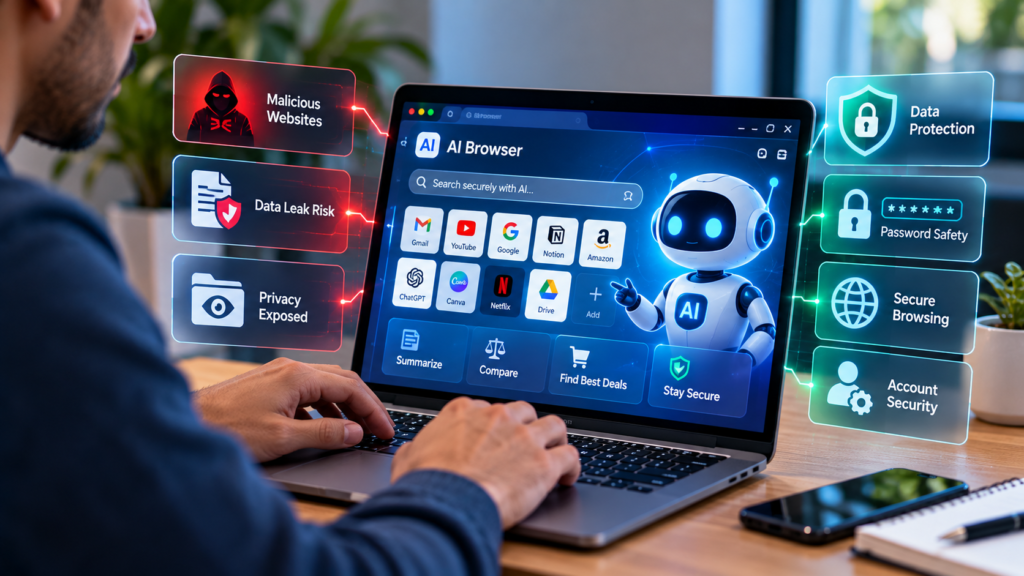
AI assistants can sometimes access webpage content, selected files, or connected services when users grant the necessary permissions. This access can make an assistant more useful, but it can also create privacy concerns.
Consider someone working on a laptop with email, cloud storage, business documents, and social media accounts open in different tabs. If an AI agent receives broad access, it may be able to interact with information unrelated to the task.
Even without a malicious attack, an incorrect instruction or poorly configured workflow could expose information that should remain private.
How to protect yourself:
- Give AI tools access only to the information required for a specific task.
- Avoid connecting sensitive accounts without a clear reason.
- Close unnecessary tabs before using browser automation.
- Keep confidential documents separate from routine browsing.
- Review permissions whenever a tool adds new capabilities.
A useful habit is to ask yourself whether the assistant genuinely needs access to a particular account before allowing it.
2. Prompt Injection From Malicious Websites
Prompt injection is a security concern that arises when an AI system processes instructions hidden inside content it is supposed to analyze.
For example, you might ask an AI assistant to summarize a webpage. That page could contain malicious text designed to manipulate the assistant into ignoring the original request or attempting an unrelated action.
The instructions might be visible to readers or hidden within page content. The important point is that website content should be treated as untrusted information, not as permission to perform sensitive operations.
This becomes especially important when an AI agent can interact with accounts or other online services.
How to reduce the risk:
- Be cautious when allowing AI agents to browse unfamiliar websites.
- Use tools that separate webpage content from trusted instructions.
- Require confirmation before sharing files or sending messages.
- Avoid giving agents unrestricted access to sensitive accounts.
- Stop automated tasks when their behavior becomes unexpected.
Prompt injection is not solved simply by asking an AI to ignore malicious instructions. Effective protection also depends on how the browser and AI system are designed.
3. Password and Online Account Security
Your browser may contain active sessions for email, social media, business dashboards, and other important services. An AI agent does not necessarily need to know your password to interact with a website where you are already signed in.
If an agent has permission to use that session, an error or security weakness could potentially affect the account.
For example, a website owner who gives an automation tool access to an administrator dashboard should consider what could happen if the tool performs an unintended action.
Practical safety measures:
- Use unique, strong passwords for important accounts.
- Enable multifactor authentication wherever available.
- Avoid sharing passwords, recovery codes, or authentication secrets in AI conversations.
- Use separate browser profiles for sensitive activities.
- Review active sessions and account activity periodically.
If you manage a website, keep administrator access limited to trusted users and tools that genuinely need it.
4. Privacy Risks From AI Browser Extensions
Browser extensions can add useful features such as translation, writing assistance, research summaries, and productivity tools. However, their access to browser information varies considerably.
Some extensions need permission to read the content of websites. Others may request access across multiple sites. If an extension receives broader permissions than its purpose requires, your privacy may be unnecessarily exposed.
Installing several similar extensions can also make it harder to understand which tools have access to your information.
What you can do:
- Check the developer and source before installing an extension.
- Read its requested permissions carefully.
- Remove extensions that you no longer use.
- Review its privacy policy and data-handling practices.
- Avoid granting access to every website when narrower permissions are available.
Remember that a professional-looking extension page is not proof that a product is secure.
5. AI Agents Performing Unwanted Actions
AI agents are designed to help users complete tasks, and some can do more than provide suggestions. Depending on the product and permissions, they may fill out forms, send messages, update records, or interact with online shopping services.
This creates a practical challenge: an assistant can misunderstand a request even when the user has good intentions.
Suppose you ask an agent to prepare an online purchase. It might select the wrong item, misunderstand a quantity, or proceed farther than you expected.
How to stay in control:
- Review orders before making payments.
- Confirm recipients before sending emails or messages.
- Approve important changes to account settings.
- Set spending or action limits when the product supports them.
- Check the final result instead of assuming every step was completed correctly.
AI automation is often most useful when it handles repetitive preparation while leaving important decisions under human control.
6. Incorrect AI Answers and Misleading Recommendations
Not every security-related problem involves a hacker. AI assistants can also misunderstand a webpage, summarize information incorrectly, or recommend an unsafe action based on unreliable content.
Imagine asking an AI browser to find a software download. It might summarize an outdated page or misunderstand which download link is official.
Similarly, an AI-generated explanation of a privacy policy may leave out a significant condition.
Protect yourself by:
- Checking important claims against their original sources.
- Verifying publication dates and software versions.
- Downloading programs from official websites.
- Avoiding decisions based only on an AI-generated summary.
- Confirming technical instructions before changing security settings.
AI can make research faster, but the original source remains important when accuracy matters.
7. Browsing History and Data Retention Concerns
Some AI products can retain conversation history, saved preferences, or information from connected services. Others offer controls that limit how information is stored or used.
The available options differ from one provider to another. Users should not assume that every AI browser collects the same data or follows the same retention policy.
The concern becomes more significant when people use AI tools for confidential business discussions, personal documents, or private research.
Steps to improve privacy:
- Review the provider’s privacy and data-retention policies.
- Check whether browsing activity or conversation history is saved.
- Avoid submitting confidential information unless the service is appropriate for it.
- Review connected accounts and remove unnecessary access.
- Use available privacy controls to manage stored information.
Before relying on an AI assistant for sensitive work, understand what information it can access and how the provider handles that information.
8. Fake AI Tools and Dangerous Downloads
The popularity of AI has created opportunities for misleading websites, imitation products, and questionable browser extensions.
A fraudulent website may use familiar branding or promise free access to a popular service. Its real purpose could be to collect credentials, display deceptive advertisements, or encourage users to install unwanted software.
These threats are not unique to AI, but they can be difficult to spot when a product appears similar to a trusted tool.
Simple ways to stay safer:
- Visit official websites rather than clicking unfamiliar download advertisements.
- Verify the publisher before installing an extension.
- Be suspicious of unexpected security warnings and urgent download requests.
- Keep your operating system and browser updated.
- Never disable security protections just because an unfamiliar website tells you to.
If you are unsure whether an AI tool is legitimate, verify its developer and official distribution channel before installing it.
9. Excessive Permissions and Outdated Security Settings
Sometimes, the greatest risk comes from settings users rarely review.
An AI extension might initially request access for a useful task. Months later, you may stop using it but leave its permissions unchanged. Another tool might introduce new capabilities that require a fresh review.
Over time, unnecessary access can accumulate.
Improve your security with these habits:
- Disable features that you do not need.
- Review connected applications and extensions regularly.
- Install browser and operating system security updates.
- Use limited-access accounts for routine automation.
- Test unfamiliar AI tools with low-risk tasks first.
You do not need to disable every AI feature to browse safely. The goal is to provide each tool with enough access to work effectively, without exposing unrelated information.
AI Browsers vs. Traditional Browsers: Understanding the Difference
AI-powered browsers and traditional browsers share many features, but their workflows can differ.
| Feature | Traditional browsing | AI-assisted browsing |
|---|---|---|
| Finding information | Users navigate and search manually | AI may help search, navigate, and summarize |
| Comparing products | Users review individual pages | AI may collect and organize information |
| Completing forms | Users generally enter information themselves | Some tools can assist with or automate entry |
| Managing multiple steps | Users coordinate each step | Agents may plan and execute sequences |
| Main security considerations | Browser vulnerabilities, malicious sites, and extensions | Conventional risks plus AI-specific threats and agent permissions |
| User oversight | Usually direct interaction | Depends on how much automation is enabled |
These are general differences rather than rules for every product. Many conventional browsers include AI features, and some AI assistants can only provide suggestions instead of acting independently.
The most important factor is how much access and autonomy the tool receives.
How to Choose a Safer AI Browser
Choosing an AI browser should involve more than checking its appearance, popularity, or list of features. Consider how it handles your information and what control it gives you over automated actions.
Another way to manage AI browser security risks is to test new features with non-sensitive information before connecting important accounts. This approach helps users understand how an AI assistant behaves without unnecessarily exposing private documents or business data.
When comparing different products, consider how each browser handles AI browser security risks. Look for transparent privacy policies, restricted permissions, regular security updates, and clear controls over automated tasks before choosing a tool.
Check permission controls
Look for clear settings that let you manage access to websites, files, and connected services. A tool that supports restricted access is generally easier to manage than one that requires broad permissions for every task.
Look for meaningful confirmation steps
Sensitive actions should receive appropriate human review. For example, purchasing an item, sending confidential information, or changing an important account setting should not happen without clear authorization.
Read the privacy policy
Check what information the provider collects, whether it retains browsing content, and how connected data is handled. Pay attention to retention periods and the available options for managing your information.
Review update and security practices
Look for regular software updates, clear security documentation, and a responsible process for addressing vulnerabilities.
Consider separate accounts and browser profiles
Using a separate browser profile or limited-access account for AI-assisted work can help reduce unnecessary exposure. This is particularly useful when working with business systems or website administration.
No single feature guarantees safety. A combination of sensible permissions, technical safeguards, regular updates, and careful user oversight provides a stronger foundation.
When evaluating AI browser security risks, pay attention to permission controls, privacy settings, and the ability to review automated actions. The best approach to reducing AI browser security risks is to choose trustworthy software, limit unnecessary access, and require approval before sensitive information is shared.
A Simple AI Browser Security Checklist
Before allowing an AI assistant to interact with your accounts, use this checklist:
- Verify the browser or extension’s official source.
- Review permissions before enabling advanced features.
- Enable multifactor authentication on important accounts.
- Keep your browser and operating system updated.
- Require approval for purchases and sensitive actions.
- Avoid sharing passwords and recovery codes with AI tools.
- Review saved information and connected accounts.
- Verify important AI-generated information using original sources.
You do not need to complete every task at once. Start with the accounts and permissions that would cause the greatest problems if they were misused.
Regularly reviewing your settings is one of the simplest ways to address AI browser security risks. Check which extensions can access your browsing activity, remove tools you no longer need, and review account permissions whenever you install a new AI feature.
Why AI Browser Security Matters for Bloggers and Website Owners
Bloggers, freelancers, and website owners often manage several online services from the same computer. These may include content management systems, email accounts, analytics dashboards, advertising platforms, and social media profiles.
An AI tool connected to a website’s administrator account may have access to unpublished articles, settings, or other business information, depending on its permissions.
If that tool performs an unintended action or its access is misused, the consequences could include unwanted changes, exposed information, or disruption to website operations.
Website owners should take a few additional precautions:
- Use strong, unique credentials for administrator accounts.
- Enable multifactor authentication where supported.
- Give team members and automation tools only the access they need.
- Maintain reliable backups of website files and databases.
- Update the content management system, themes, and plugins.
- Review administrator activity and investigate unexpected changes.
For more website protection guidance, read our related article on critical PHP security vulnerabilities and essential fixes for website owners.
AI can help with research, editing, and repetitive publishing tasks. However, website administration and publishing permissions deserve particular care because a mistake can affect both your content and your audience.
What Does the Future Hold for AI Browser Security?
AI-powered browsing will likely continue to evolve as developers improve automation and connect assistants to more online services.
These improvements may make routine tasks faster, but they also increase the importance of clear permission boundaries and reliable security controls.
Future improvements will need to address several areas, including protection against malicious webpage instructions, separation between untrusted content and trusted commands, limited access to private information, and better review of automated actions.
Users should also expect clear explanations of what an AI tool can do and meaningful ways to control sensitive operations.
Businesses, meanwhile, need policies that distinguish low-risk activities, such as summarizing public information, from high-risk tasks involving confidential records, payments, or administrator access.
The most useful AI tools will not simply perform more actions. They will help people complete tasks while making it easier to understand and control what happens.
Reducing AI browser security risks starts with small but consistent habits. Keep your software updated, protect your accounts, review connected extensions, and verify important information. These practical steps can help minimize AI browser security risks without giving up the productivity benefits of artificial intelligence.
Frequently Asked Questions
1. Are AI browsers safe to use in 2026?
AI browsers can be useful, but their safety depends on the product, its security controls, the permissions granted, and how it is used. Review the available privacy settings and avoid granting unnecessary access to sensitive accounts.
2. What is the biggest risk of AI-powered browsing?
One important concern is that malicious webpage content may manipulate an AI agent into attempting an unintended action. Excessive permissions, data exposure, and errors during automation are other risks worth considering.
3. Can an AI browser access my passwords?
It depends on the product and its permissions. An AI agent may interact with an already authenticated website without necessarily seeing the underlying password. Use a password manager, enable multifactor authentication, and avoid sharing authentication secrets in AI conversations.
4. What is prompt injection in AI browsers?
Prompt injection is an attempt to influence an AI system through instructions embedded in content it processes. A malicious webpage may try to redirect the assistant away from the user’s intended task or encourage unsafe behavior.
5. How can I protect my privacy when using AI assistants?
Limit permissions, review data-retention settings, avoid sharing unnecessary personal information, protect important accounts with multifactor authentication, and require approval before sensitive actions.
6. Should businesses block every AI browser?
Not necessarily. Businesses can evaluate tools individually, establish acceptable-use policies, restrict access to sensitive systems, and permit approved products under appropriate security controls.
7. Can prompt injection be completely prevented?
No single defense guarantees complete protection against every prompt-injection technique. Stronger security requires multiple safeguards, including permission restrictions, separation of untrusted content, monitoring, and human approval for sensitive actions.
Ultimately, managing AI browser security risks requires a balance between convenience and caution. Choose reliable tools, understand their limitations, and remain involved whenever an automated action could affect your privacy, finances, or online accounts.
Taking time to understand AI browser security risks is a worthwhile step for students, freelancers, and business owners. The right precautions can reduce unnecessary exposure while allowing users to benefit from AI-powered browsing.
Conclusion
AI browser security risks deserve attention as artificial intelligence becomes a bigger part of everyday internet use. AI assistants can save time, simplify research, and help people manage repetitive work, but their capabilities also raise important questions about privacy, permissions, and control.
Fortunately, protecting yourself does not require abandoning AI technology. Start by choosing reputable tools, reviewing permissions, protecting your accounts, and checking important information against reliable sources.
If you manage a business or website, pay particular attention to administrator access, confidential data, and automated publishing actions.
Most importantly, do not assume that an AI assistant will always understand your intentions or make the right decision. Keep control of sensitive tasks and expand automation gradually.
The smartest way to use AI is to combine its convenience with responsible security habits. With sensible precautions, you can take advantage of modern browsing tools while reducing avoidable risks to your personal information and online accounts.