
A message arrives on your phone claiming that you have an unpaid traffic challan. It includes a vehicle number, a payment warning, and a link to download an application to view the fine. The message may look genuine, especially when it uses the name of a government transport department. But downloading that application could put your personal information and financial security at risk.
The Fake eChallan APK scam is a serious cybersecurity concern for Android users in India. Fraudsters are impersonating Regional Transport Office (RTO) services and government traffic-challan notifications to convince people to install malicious applications. Once installed, these apps may request sensitive permissions and help criminals access private information, including SMS messages and financial credentials.
India’s national cybersecurity agency, CERT-In, issued an advisory on March 17, 2026, describing a campaign that uses fake RTO and eChallan messages to distribute Android malware. The warning highlights why people should verify traffic fines through official government services instead of downloading applications from unexpected links.
What Is the Fake eChallan APK Scam?
The fake eChallan APK scam is a form of mobile malware and social engineering fraud. Criminals pretend to represent traffic police, an RTO office, or a government transport service. They then send messages claiming that the recipient has received a traffic fine.
The Fake eChallan APK scam is part of a growing mobile cybersecurity problem in India. Criminals use trusted government service names to trick Android users into downloading harmful applications. Similar threats also highlight the importance of understanding Java security vulnerabilities and protecting personal devices.
The message usually asks the user to download an application file to view challan details, check a receipt, or complete a payment. Some reported filenames include variations such as:
- RTO Challan.apk
- RTO E Challan.apk
- MParivahan.apk
- Other similar transport-related names
These names are designed to make the file appear trustworthy. However, a familiar-looking filename does not prove that an application is genuine or government-approved.
According to CERT-In’s official cybersecurity advisory, the reported campaign uses a multi-stage process to install malware on targeted Android devices.
How Does the Fake eChallan APK Scam Work?
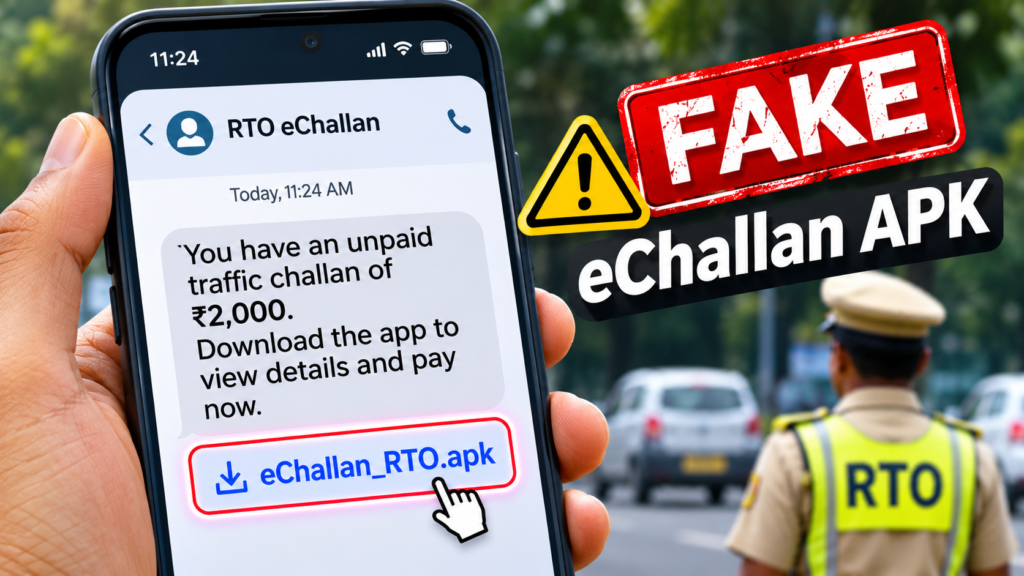
The fraud often begins with a simple message. It may claim that a traffic violation has been recorded and that the recipient must download a receipt or pay a fine immediately.
A Fake eChallan APK scam can begin with a simple traffic-fine notification. However, the downloaded application may secretly request permissions that expose private messages, financial information, and other sensitive data. Users should never install an unfamiliar application simply because a message looks official.
Here is how the attack can develop:
1. Victims Receive a Fake Traffic Challan Message
Fraudsters send SMS or messaging-app notifications claiming that a vehicle has an unpaid traffic fine. The message may include a payment deadline or warning to encourage quick action.
Because people naturally want to avoid penalties, some recipients open the link without checking its source.
2. A Malicious APK File Is Downloaded
The link may lead to a website that looks similar to an official transport service. Instead of directing users to a legitimate government application store page, it offers an APK file for direct installation.
An APK is an Android application package. It is a file format used to distribute and install Android apps. APK files are not automatically dangerous, but files received from unknown websites or unexpected messages can contain harmful code.
3. The Application Requests Sensitive Permissions
After installation, the suspicious app may request access to SMS messages, phone calls, and background activity.
These permissions can create serious privacy and security risks. If a user approves them, malicious software may be able to monitor communications or collect information that should remain private.
4. Additional Malware May Be Installed
CERT-In’s advisory describes a multi-stage malware process in which the initial application acts as a dropper. The actual malicious component may be installed after the user interacts with an update prompt.
This technique can make the threat harder for ordinary users to recognise.
5. Banking Information and OTPs May Be Targeted
The malware campaign described by CERT-In uses fake financial screens to trick victims into entering sensitive credentials. It may also access SMS messages, potentially exposing one-time passwords (OTPs).
If criminals obtain enough information, they may attempt unauthorised financial transactions.
For further information, read Moneycontrol’s report on the fake eChallan malware campaign.
What Information Can a Malicious APK Steal?

The exact information exposed depends on the malware, the permissions granted, and the security settings of the affected device.
Potentially exposed information may include:
- SMS messages and OTPs
- Banking or payment credentials entered into fake screens
- Personal information stored on the device
- Phone and communication details
- Information about installed applications
- Other sensitive data accessible through granted permissions
Some malware may also request permission to create a VPN connection. CERT-In warns that this can create an opportunity for attackers to monitor internet traffic from an infected device.
The Fake eChallan APK scam demonstrates how malicious software can put personal information and financial accounts at risk. Android users should review app permissions carefully and learn more about PHP security vulnerabilities to understand wider online security risks.
This does not mean every APK file is harmful. The danger comes from installing untrusted software and granting unnecessary access to applications.
How Can You Identify a Fake eChallan Message?
Fraudulent messages often use urgency and official-looking language to make people act without checking the details.
One important warning sign of a Fake eChallan APK scam is a message that pressures users to install an application immediately. Always check the sender, inspect website addresses, and verify traffic fines through the official government portal instead of trusting unexpected download links.
Watch for these warning signs:
An Unexpected APK Download
A message asking you to download an APK file to view a traffic fine should be treated with suspicion. Do not install applications received through unexpected SMS, WhatsApp, Telegram, or random websites.
Unusual Website Addresses
Check the website address carefully. Fraudsters may use domains that resemble government websites but contain extra words, spelling changes, or unfamiliar extensions.
Instead of opening a message link, type the official website address into your browser yourself.
Requests for Excessive Permissions
A traffic-fine information service should not need unrestricted access to your private messages or phone activity through an unknown APK.
Be especially cautious when an unfamiliar app requests SMS, phone, accessibility, or VPN permissions.
Pressure to Pay Immediately
Messages threatening immediate penalties or legal action can be designed to create panic. Take time to verify the information before responding.
For additional guidance, see Delhi Police’s warning about fake eChallan messages.
How to Check a Genuine Traffic Challan in India

The safest approach is to avoid links sent in unexpected messages and use the official government service directly.
Vehicle owners can verify their challan information through the official Parivahan eChallan portal.
Follow these basic steps:
- Open your browser and enter the official eChallan website address yourself.
- Check that the domain is exactly echallan.parivahan.gov.in.
- Use the available challan or vehicle details search option.
- Review the information shown on the official portal.
- Follow the payment instructions provided by the official service, if a genuine challan is listed.
You can also check the official mParivahan service information.
Never rely on an APK download link simply because a message includes your vehicle registration number.
How to Protect Your Android Phone from Fake APK Scams
A few practical security habits can significantly reduce the risk of mobile malware infections.

Protection against the Fake eChallan APK scam starts with safe downloading habits. Always use trusted application stores, keep your Android device updated, and avoid suspicious links. You can also explore our guide on how to protect yourself from online security threats for additional cybersecurity awareness.
1. Avoid APK Files from Unknown Sources
Do not install applications received through unexpected messages or unofficial websites. Prefer trusted app stores and verified developer sources.
2. Keep Unknown App Installation Disabled
Android devices provide settings that control whether applications can be installed from sources outside the official app store.
Keep this permission disabled unless there is a genuine reason to use it. Do not enable it just because a message asks you to install a traffic application.
3. Review App Permissions
Before installing an application, consider whether its requested permissions make sense for its purpose.
Be cautious if a simple information app requests access to SMS messages, phone calls, Accessibility Services, or VPN settings.
4. Keep Your Phone Updated
Install Android security updates and application updates from trusted sources. Updates can help address known security weaknesses.
5. Use Google Play Protect
Keep Google Play Protect enabled and pay attention to security warnings. It can help identify potentially harmful applications, although no security tool guarantees complete protection.
Google explains its app protection features in its Google Play Protect help guide.
6. Never Share OTPs or Banking PINs
Do not share an OTP, UPI PIN, banking password, or card details with anyone who contacts you unexpectedly.
A traffic-fine notification should never be treated as a reason to reveal private banking information through an unfamiliar application.
What Should You Do If You Have Already Installed a Fake APK?
If you suspect that you have installed a malicious eChallan application, act quickly. Avoid using the affected phone for banking or other sensitive activities until it has been checked.
CERT-In recommends the following response measures:
- Disconnect the phone from mobile data and Wi-Fi.
- Go to your device settings and review recently installed applications.
- Remove the suspicious eChallan application and any related unfamiliar apps where possible.
- Run a scan using a trusted mobile security tool.
- Change your banking and other important passwords from a separate, trusted device.
- Reset your UPI PIN if you believe it may have been exposed.
- Check bank statements and payment histories for transactions you do not recognise.
- Contact your bank immediately if you notice suspicious activity.
If the malicious app has gained deep device access or cannot be removed normally, seek help from a trusted cybersecurity professional or authorised service centre. A factory reset may be necessary in some cases, but make sure important evidence and files are handled carefully before taking that step.
If money has been lost through cyber fraud in India, report it immediately by calling 1930 or submitting a complaint through the National Cyber Crime Reporting Portal.
Why Is the Fake eChallan APK Scam a Serious Concern in India?

India has a large and growing population of digital payment and smartphone users. Traffic services, banking, shopping, and everyday communication increasingly depend on mobile devices.
Fraudsters take advantage of this convenience by copying familiar government names and creating messages that look urgent and believable.
The fake eChallan APK scam is especially concerning because it combines impersonation, malicious software, and financial fraud. A victim may believe they are simply checking a traffic fine, while the downloaded application is attempting to gain access to sensitive information.
In September 2026, Kerala Police also warned vehicle owners about malicious APK files distributed through fake eChallan messages. The warning reinforces the importance of checking traffic-fine information through official government services.
Read ThePrint’s report on the Kerala Police warning.
Final Thoughts
The fake eChallan APK scam is a reminder that even an ordinary-looking traffic notification can be used to trick smartphone users. A message may mention a real vehicle number or use the name of a familiar government service, but that does not make its download link safe.
The best protection is simple: do not install APK files received through unexpected messages, check traffic fines directly through the official Parivahan portal, and never share banking credentials or OTPs with unverified applications.
The Fake eChallan APK scam also shows why digital awareness is important for every smartphone user. Learning about suspicious downloads, data protection, and safe online payments can help people avoid cyber fraud. Visit NuvWire Technology for more technology and cybersecurity updates.
If you receive a suspicious challan message, pause before clicking. A few seconds spent verifying the source could help protect your phone, personal information, and money.
Frequently Asked Questions (FAQs)
1. What is the fake eChallan APK scam in India?
It is a mobile fraud campaign in which criminals impersonate RTO or government traffic services and trick Android users into installing malicious APK files.
2. Can a fake eChallan APK steal banking details?
Yes. CERT-In has warned that the reported malware campaign uses fake financial screens to capture credentials and may access SMS messages containing OTPs.
3. Is every APK file dangerous?
No. APK is a normal Android application package format. The risk comes from installing untrusted or malicious files from unknown sources.
4. How can I check whether an Indian traffic challan is genuine?
Visit the official Parivahan eChallan portal directly at https://echallan.parivahan.gov.in/ instead of using an unexpected message link.
5. Can a fake APK read OTP messages?
Malicious applications with the necessary permissions may be able to access SMS messages, including OTPs.
6. What should I do if I accidentally install a fake eChallan app?
Disconnect the phone from the internet, remove suspicious applications where possible, scan the device, change exposed credentials using a separate trusted device, and check your bank transactions.
7. Can scammers steal money through a fake APK?
They may use stolen credentials, intercepted OTPs, or other access obtained through malware to attempt unauthorised financial transactions.
8. Where can I report an online financial scam in India?
Call India’s cyber fraud helpline at 1930 or file a complaint through https://cybercrime.gov.in/.
9. Does the government send traffic challans through APK files on WhatsApp?
You should not trust an APK sent through WhatsApp or SMS as proof of a genuine challan. Verify the fine through the official government portal.
10. How can I prevent fake APK scams on Android?
Avoid unknown downloads, keep unknown-source installations disabled, review app permissions, update your phone, and use trusted app stores.